
Skip to content
LBT Trading

Auto bias detection · NQ · ES · Gold · BTC · Forex

No CE. No trade.

Auto bias detection calculates the session's directional bias for you using the same framework I use in my Discord community. That workflow is now coded into one TradingView indicator: it marks the key levels and CE wicks, then identifies entry zones when the conditions line up. You don't have to guess the bias or mark the same levels by hand. You make the final trading decision.

After checkout, submit your TradingView username. We will add access after we receive it.

Built by a funded trader · Apex, FTMO, TopStep, MyFundedFutures, LucidPro

LBT CE Algorithmic Pro on NQ
LBT Trading logo

A note from the creator

I built this because I was tired of marking the same levels every morning.

I'm Gonçalo, a self-taught trader since 2019, funded with Apex, FTMO, TopStep, MyFundedFutures and LucidPro. After years of backtesting, my edge came down to one rule: no CE, no trade. LBT CE Algorithmic Pro is that rule on your chart, exactly how I use it every London and New York session.

G, founder of LBT Trading

No CE, no trade.

The rule behind every trade I take.

The method

Three checks. In this order.

Every setup has to pass the same three checks. If one fails, there's no trade. That's the discipline the indicator is built to enforce.

No CE. No trade. One rule that keeps every trade consistent.

  1. 01

    Bias

    Start with direction. The indicator reads higher-timeframe structure and session context to mark whether the day leans bullish, bearish or has no clear bias. No bias means no trade.

  2. 02

    CE of the Wick

    Price often reacts to the midpoint of a wick, its consequent encroachment (CE). The indicator draws that 50% level on the wicks that matter, so the decision point is on your chart, not in your head.

  3. 03

    Entry

    Only when price reaches the CE in the direction of the bias does an entry zone form. If the CE isn't respected, there is no setup.

Same NAS100 trade

Before the move. After the move.

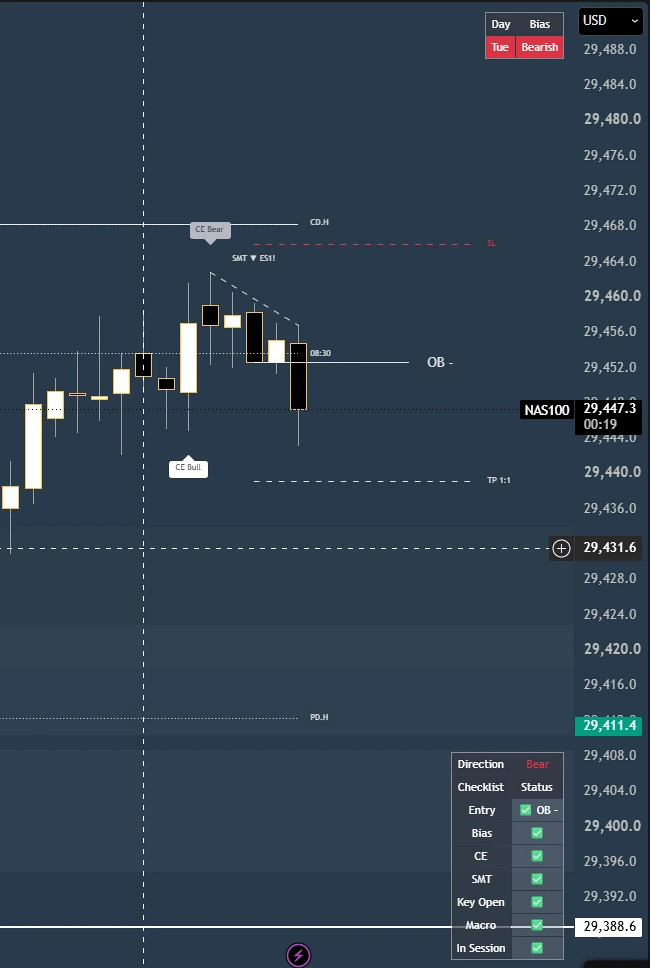
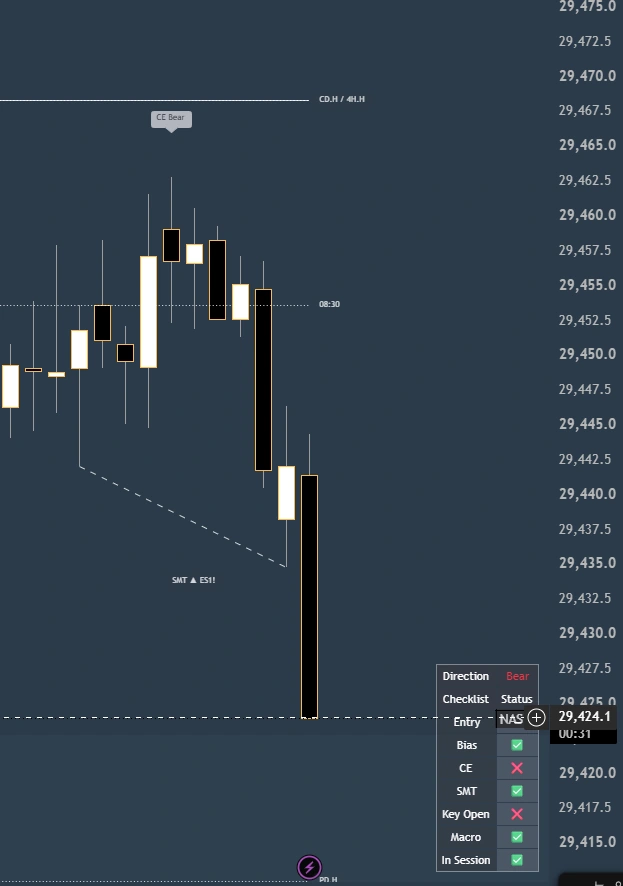
Two views of the same trade. Compare the setup and session bias with the later price reaction.
01Before the move
Before the move: NAS100 chart showing the bearish session bias, CE markers, order block, target level and LBT indicator checklist.

Setup and bias

The initial view with session direction, marked levels and checklist before the move.

02After the move
After the move: tighter view of the same NAS100 trade showing the sharp bearish price reaction, CE Bear marker and SMT divergence.

Price reaction

A tighter crop of the same trade, focused on the price reaction and SMT context.

Features

Less manual marking. More context in view.

Everything you need to run the framework lives on one chart, so you spend your time on decisions, not drawing lines.

The model

  • CE of the Wick signals: my 2026 Masterclass model. No CE, no trade.
  • Confirmed entries: IFVG, OB and CISD after a valid CE
  • Wick rejection filter that helps screen out fake breaks
  • Auto SL/TP at 1:1, 1:1.5 or 1:2, cleared when hit

The context

  • Auto Daily Bias
  • Live checklist: Bias, CE, Entry, Key Open, Macro, Session
  • Multi-timeframe FVGs (5m to 4H), nearest above and below price
  • SMT divergence, auto-paired and drawn live

The levels

  • PDH/PDL, PWH/PWL, PMH/PML, 4H and current day high/low
  • Asia, London, NY, NYSE, Lunch and PM sessions with highs and lows
  • Session opens plus NDOG/NWOG
  • Alerts: CE armed, SMT, gap touched and gap invalidated
  • Clean, professional look on any chart theme, fully customizable
  • Works on NQ, ES, Gold, BTC, forex and more

Two modes. One indicator.

Includes the Intraday Playbook and the Swing Playbook, so the same framework fits how you trade.

Intraday Playbook

For London and New York session trading

Swing Playbook

For higher-timeframe swing setups

How access works

Three steps to get access

  1. 1

    Check out on Whop

    $49/mo, billed monthly through Whop.

  2. 2

    Submit your TradingView username

    After checkout, submit your TradingView username. We will add invite-only access to that account after we receive it.

  3. 3

    Add it to your chart

    Indicators → Invite-only scripts → LBT.

Pricing

Trade the rule I trade.

The same CE of the Wick framework I use in Discord, with automatic bias detection, key levels and entry zones coded into one TradingView indicator.
Founder pricing

LBT CE Algorithmic Pro

$49/month

Billed monthly through Whop.

  • Full CE of the Wick model with confirmed entries
  • Auto bias, live checklist, MTF FVGs and SMT
  • All key levels, sessions and opens
  • Alerts and Intraday + Swing Playbooks
  • Free updates as the indicator improves
Get the Indicator

After checkout, submit your TradingView username. We will add access after we receive it.

Educational tool, not financial advice. Trading involves substantial risk of loss. Read the Risk Disclosure.

FAQ

Before you buy.

The questions traders ask me most.
What does LBT CE Algorithmic Pro do?

It automatically calculates the session's directional bias using the same CE of the Wick framework I use in Discord. It then draws the relevant CE levels, marks entry zones and alerts you when price reaches them, all in one TradingView indicator.

What are the Intraday and Swing Playbooks?

Two modes built into the same indicator: one for intraday session trading, one for higher-timeframe swing setups.

Does it repaint?

Levels are confirmed once their candle closes. Lines tied to a candle that is still forming, like the live 4H level, update until that candle closes. That's by design, so you always see the current reference.

How do I get access?

After checkout, submit the TradingView username associated with your account. We will add invite-only access to that account after we receive it. Then find the indicator under Indicators → Invite-only.

How am I billed?

LBT CE Algorithmic Pro is $49/month, billed monthly through Whop. Whop handles the payment and your receipts.

Can I get a refund?

Refunds and statutory withdrawal rights are subject to applicable law. You can manage your recurring subscription through Whop to stop future renewals. See the Refunds & Cancellation policy for details.

Will the indicator make me profitable?

No tool can promise that. It gives you a clear, repeatable process. Your results depend on your execution and risk management.

Essential

Remembers your cookie choice. Always on.

Always on

No analytics or advertising tracking is currently enabled on this website. Only essential local storage is used to remember your choice.